
No need to be a Fencer anymore
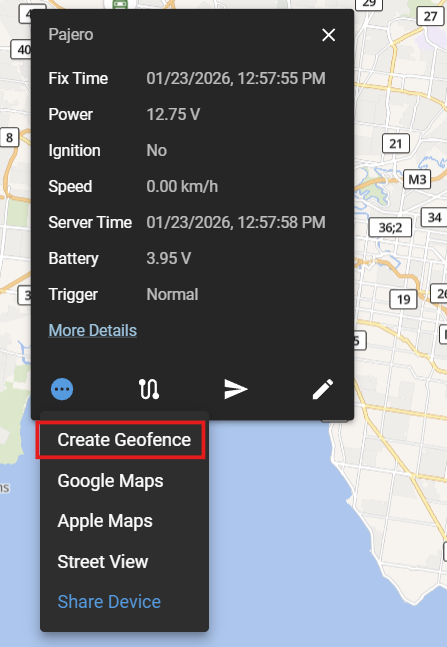
Even with an immobiliser, sometimes you just want to know if your car is being moved. Like with most GPS tracking service, “Geofences” are available for you to manually define an area around your vehicle so you can get notified if the vehicle moves outside of it.
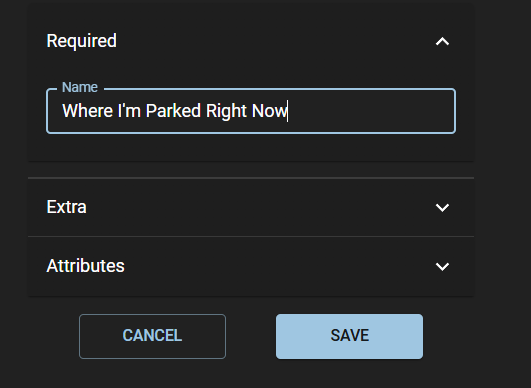
It’s super easy to do of course. Select your vehicle, click the three dots, click “Create Geofence”, then give it a name and Save it.
Yeah, but it’s still work…
Yeah. Yeah, it’s still a bit of work. Plus you have to delete it when you no longer need that geofence!
Some of our customers have indeed said “Ed, uh, having to delete a bunch of geofences that I just use for when I’m parking at the airport or the shops is a bit rubbish”.
They’re right. Geofences you create really should be used for places you commonly visit. Otherwise, it’s just work. And we already have a job - one that actually pays us.
…So Auto Geofences are now here!
All new installs as of late January 2026 now include automatic Geofences that don’t bother you unless you need to be bothered. All existing installs will get the feature automatically rolled out over the next few weeks leading into late February 2026.
We’ll keep it real simple:
Once you park your car and turn off the ignition, an implicit 200 metre radius geofence is created around your car
If the car moves outside of the geofence without the engine running, you will receive an Unauthorised Movement alarm notification on your phone.
Obviously there is an assumption here about having a good immobiliser fitted to stop the engine being started - whether Ghost, IGLA, or our own!
Yes but what if I’m really worried?
OK, if you’re really worried about the “What if” scenarios, read our user guide on Notifications and just turn on these Notifications as well:
Ignition ON
Device Moving
Alarm: Towing
With the full suite of Auto GeoFence and these Notifications, you no longer need to have a side gig as a Fencer.

Can. He. Fence. It? Why would he bother?
